
Every page on your site has two things Google shows in the search results: a title (the blue clickable headline) and a meta description (the grey summary underneath). Rank Math’s Titles & Meta section is where you set the rules for how those are generated across your whole site — automatically, so you don’t have to write them by hand for every page.
This is one of the most powerful screens in the plugin, and also one people find confusing. Let’s make it simple.
📚 Part 3 of my in-depth Rank Math series (within my WordPress Plugin Guides). Catch up with Part 1 and Part 2 if you haven’t yet.
Where to find Titles & Meta
In the sidebar, go to Rank Math SEO → Titles & Meta. The screen is split in two: a settings menu down the left, and the options for whatever you’ve selected on the right. It opens on Global Meta — the site-wide defaults.
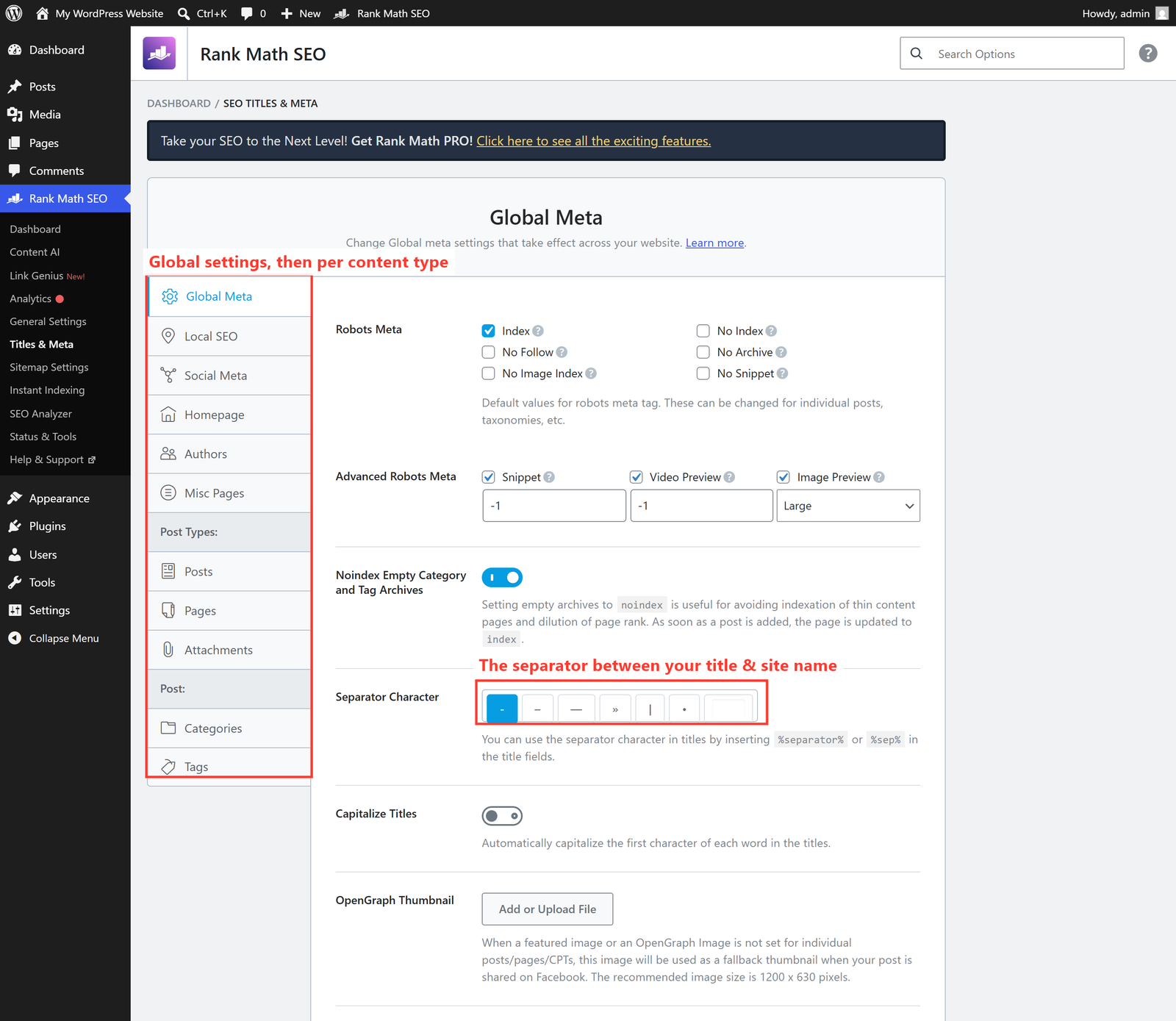
The two columns, explained
- The left menu — the top group (Global Meta, Local SEO, Social Meta, Homepage, Authors) sets site-wide rules. Below that, Post Types lets you set different rules for Posts, Pages and Attachments individually.
- The separator character — the small symbol (a
|, dash or dot) that sits between your page title and your site name, like My Page Title | Your Brand. Pick whichever you prefer; it’s purely cosmetic.
Title templates & variables
Open Post Types → Posts and you’ll see a Single Post Title field with something like:
%title% %sep% %sitename%
Those %percent% tags are variables — placeholders Rank Math fills in automatically. %title% becomes the post’s title, %sep% becomes your separator, and %sitename% becomes your site name. So every blog post automatically gets a tidy, consistent title in Google without you lifting a finger. You can click the variable button to insert others (category, date, author, and more).
Sensible defaults to leave alone
- Robots Meta → Index should be ticked for Posts and Pages — that means “yes, Google, please list these.”
- Noindex Empty Category and Tag Archives — leave this on. It stops thin, near-empty archive pages from cluttering Google.
- Attachments — it’s good practice to redirect attachment pages to the post (Rank Math’s default), so you don’t get flimsy image pages indexed.
💡 These are defaults, not handcuffs. Titles & Meta sets the fallback title and description for every page. Whenever you want, you can override them on an individual post or page — which is exactly what we’ll do in Part 4.
🚀 Try it yourself: In WordPress Playground, open Titles & Meta → Posts and change the separator character. Watch the live preview update — a safe way to see how the title template builds before you touch your real site.
What’s next
With your site-wide titles set, it’s time for the part that matters most for ranking: optimising an individual post. In Part 4 — the heart of this series — we’ll walk through the per-post SEO box, the focus keyword, and the famous green score. Continue to Part 4 →
Want your titles and meta dialled in properly across every template? That’s the kind of detail I handle on every build. See how I can help with SEO — or just reach out and say hi.