
You’ve got the right plugins installed (that was Part 6). Now for the question that keeps business owners up at night: “How do I actually show up on Google?”
That’s SEO — Search Engine Optimization. It has a reputation for being mysterious and technical, but the fundamentals that move the needle for most small businesses are genuinely simple. You don’t need to be an expert; you need to get the basics right and be consistent. Let me show you what actually matters.
📚 This is Part 7 of my “WordPress Zero to Hero” series. A 10-part, plain-English path from “what is WordPress?” to confidently running your own site. You can see every part of the series here — bookmark it and follow along.
What SEO really means
SEO is simply helping Google understand your site so it shows you to the right people. When someone searches “emergency plumber in Leeds,” Google tries to serve the most relevant, trustworthy, fast-loading results. SEO is the work of making your site an easy “yes” for that decision. Good news: WordPress is excellent for SEO out of the box, and a good SEO plugin guides you the rest of the way.
First, fix your permalinks
A permalink is the web address of each page. The single most common technical SEO mistake I see is leaving WordPress on its ugly default URL setting (something like yoursite.com/?p=123). You want clean, readable URLs that include real words.
Go to Settings → Permalinks and choose “Post name.” That’s it — do it once, early, and your URLs become tidy and descriptive:
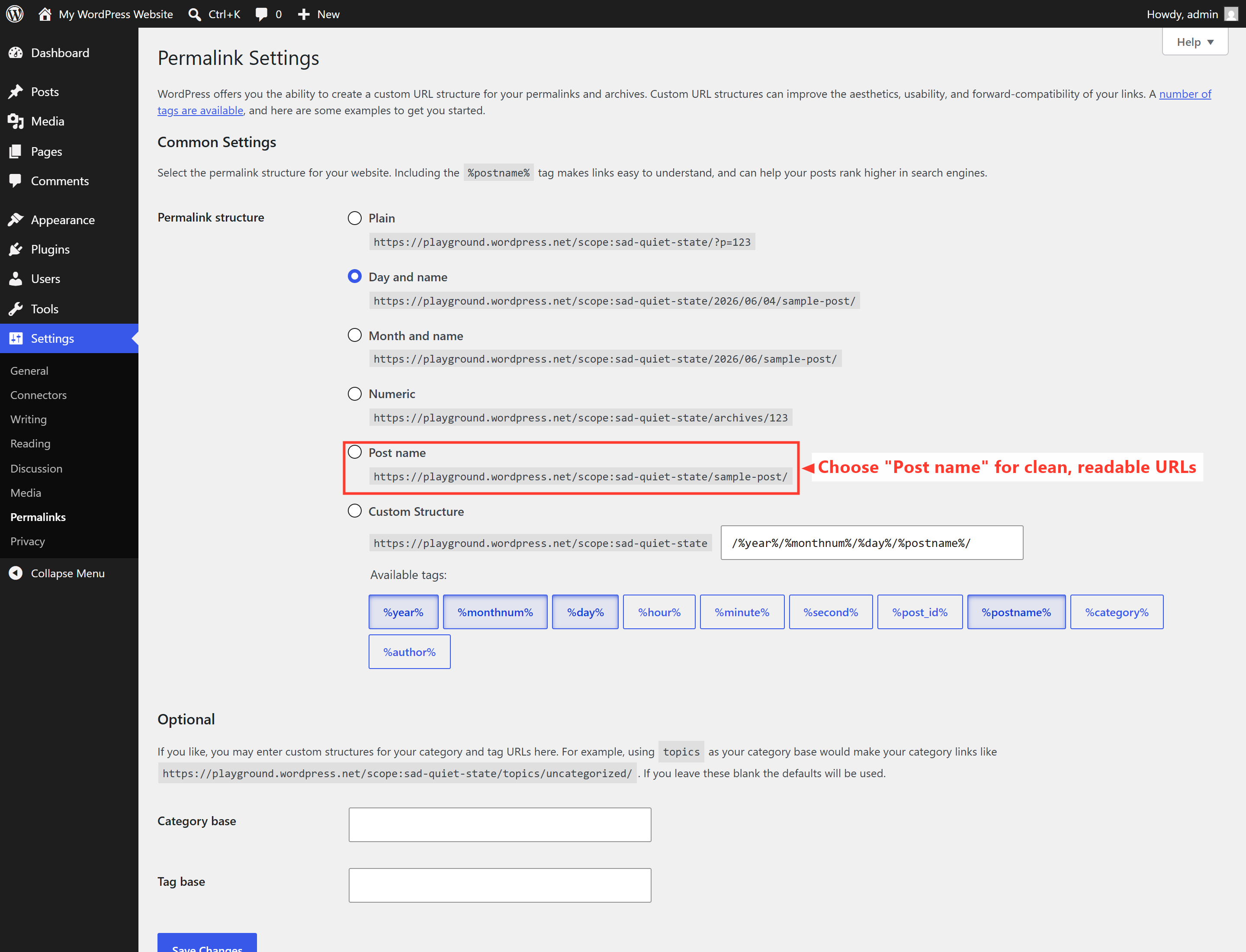
⚠️ Do this early on a new site. Changing permalinks after a site has been live for a while changes every URL, which can break links and lose rankings unless redirects are set up. On a fresh site it’s harmless — so set “Post name” before you publish much.
The on-page basics that matter most
With an SEO plugin like Rank Math or Yoast installed, you’ll get a tidy box under every page and post to fill in. Focus on these:
- SEO title — the clickable headline in Google. Include what people actually search for, plus your name or brand.
- Meta description — the short summary under that title. It doesn’t directly rank you, but a good one wins the click.
- Focus keyword — the main phrase you want that page to rank for. One clear phrase per page.
- Headings — use one clear H1 (your title) and logical H2/H3 subheadings. Structure helps readers and Google.
- Image alt text — describe each image in plain words. Good for accessibility and image search.
The bigger levers (beyond the settings)
Settings get you tidy; these get you found:
- Genuinely useful content. Answer the real questions your customers ask. Helpful pages earn rankings; thin pages don’t. (This very series is an example.)
- Speed and mobile-friendliness. Google favours fast sites that work on phones. That’s Part 8.
- Local SEO. If you serve an area, claim your free Google Business Profile and keep your name, address, and phone consistent everywhere.
- Internal links. Link your pages to each other sensibly (like the “Part 8” links here). It helps visitors and Google navigate.
- Patience. SEO compounds over months, not days. Consistency beats intensity.
One more free essential: connect your site to Google Search Console. It’s the official, free tool that shows what you rank for and flags issues — the closest thing to a direct line from Google about your site.
🚀 Try it yourself: In WordPress Playground, open Settings → Permalinks and switch to “Post name.” Then create a page and watch its URL become clean and readable. That one setting is a free, two-second SEO win.
What’s next in the series
SEO and speed are joined at the hip — so next we tackle performance. In Part 8, I’ll explain why your site might be slow and how to fix it, in terms that don’t require an engineering degree. Follow the full series here.
Want to actually rank for the searches your customers are typing? SEO that brings in real inquiries is a core part of what I do. See how I can help — or hire me on Upwork and say hi there.