
Your dashboard is starting to feel familiar (that was Part 3). Now for the question every business owner cares about most: “How do I make my site actually look good — like my brand, not a generic template?”
The answer involves two words you’ll hear constantly: themes and page builders. People mix them up all the time, and choosing the wrong approach is how sites end up looking dated or becoming a nightmare to edit. Let me untangle them.
📚 This is Part 4 of my “WordPress Zero to Hero” series. A 10-part, plain-English path from “what is WordPress?” to confidently running your own site. You can see every part of the series here — bookmark it and follow along.
What a theme actually is
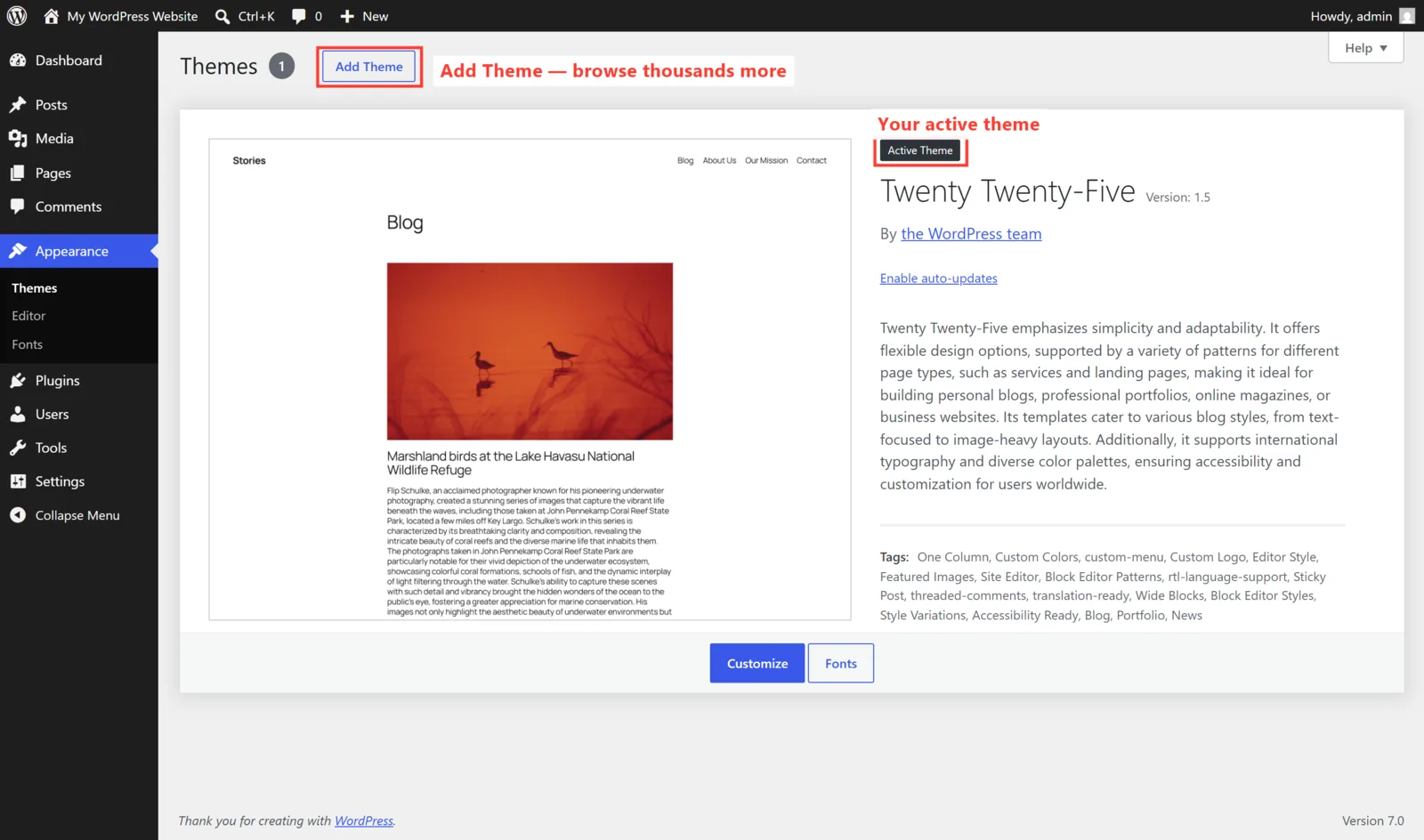
A theme is the design skin of your website. It controls your colors, fonts, layout, and overall look — without changing your actual content. Swapping themes is a bit like changing the outfit on a mannequin: the body (your pages and posts) stays the same; the styling changes.
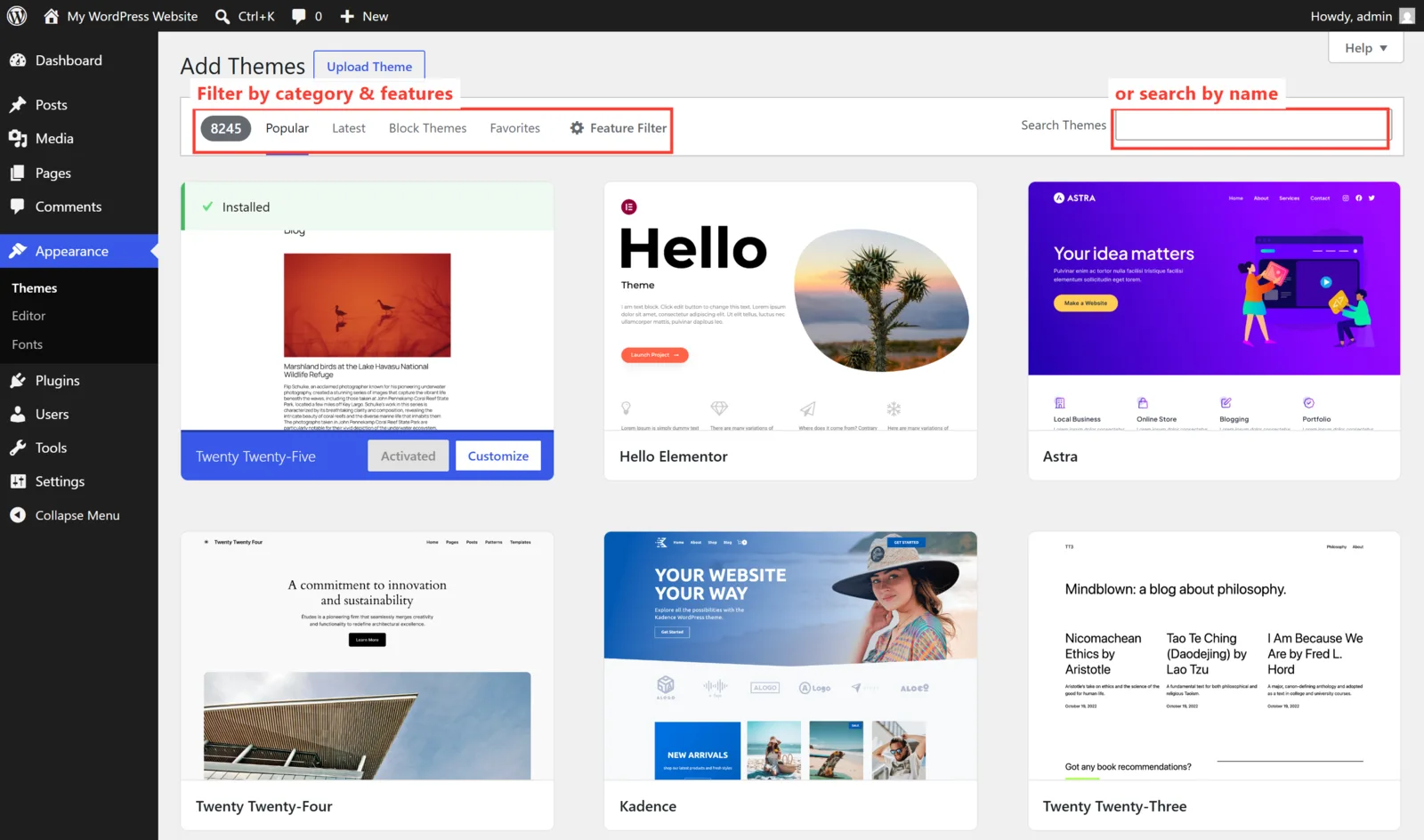
WordPress comes with a few free themes built in, and there are thousands more — free and paid — in the official directory. You manage them under Appearance → Themes:
Click Add New and you can browse and install thousands more, filtering by features and previewing before you commit:
So what’s a page builder?
Here’s the limitation: most themes give you a fixed design. You can tweak colors and a logo, but you can’t easily drag things around to build a totally custom layout. That’s where a page builder comes in.
A page builder is a plugin that adds drag-and-drop design to WordPress. Instead of being stuck with the theme’s layout, you build pages visually — dropping in headings, images, buttons, columns, and sections exactly where you want them, and seeing the result live as you work. Elementor is the most popular one, and it’s what I use for most client sites.
The simplest way to hold the two ideas in your head:
| Theme | Page builder (e.g. Elementor) | |
|---|---|---|
| What it does | Sets your site’s overall style and structure | Lets you design individual pages visually, block by block |
| Editing feel | Choose options and settings | Drag, drop, and click to edit live |
| Flexibility | Limited to the theme’s layouts | Almost unlimited custom layouts |
| Best when | You want simple and fast | You want a bespoke, branded design |
In practice, the two work together: you run a lightweight theme (Hello Elementor and Astra are popular choices) and let the page builder handle the actual design. That combination is what powers a huge share of professional WordPress sites — including this one.
The trade-off nobody mentions
⚠️ Power has a price: weight. Page builders add flexibility, but if they’re used carelessly they can slow your site down. The fix isn’t to avoid them — it’s to build cleanly, use a fast host, and not pile on twelve overlapping plugins. We’ll tackle speed properly in Part 8. Used well, a builder like Elementor is perfectly fast.
What I recommend for business owners
- Want something simple and quick? A good modern theme with light customization may be all you need.
- Want a distinctive, branded site you can keep editing yourself? A lightweight theme plus a page builder (Elementor) is the flexible, future-proof route.
- Pick a builder and stick with it. Switching builders later is messy because each one stores its layouts differently. Choose once, deliberately.
- Beware “free” bloated theme bundles that cram in dozens of demos. They look great in the ad and feel sluggish in real life.
🚀 Try it yourself: In WordPress Playground, go to Appearance → Themes → Add New and activate a different theme. Watch your whole site restyle in seconds — same content, brand-new look. That single click is the best way to feel what a theme really does.
What’s next in the series
You can now shape how your site looks. Next we make it navigable. In Part 5, I’ll cover pages, posts, menus, and site structure — the difference between a page and a post (people get this wrong constantly), and how to organize everything so visitors actually find what they need. Follow the full series here.
Designing a clean, fast, on-brand WordPress site — usually with Elementor — is the core of what I do. If you’d rather skip the trial and error, take a look at how I can help, or hire me on Upwork and say hi there.