
This is the part of the series I most wanted to write — because it’s the part you’ll actually use every single time you publish. All the settings in Parts 1–3 were groundwork. Optimising an individual post is where the day-to-day SEO really happens, and Rank Math makes it almost like a game: pick a focus keyword, follow the checklist, watch your score climb.
Let’s walk through the per-post SEO box from top to bottom.
📚 Part 4 of my in-depth Rank Math series (within my WordPress Plugin Guides) — and the most important one. If titles and templates are still fuzzy, skim Part 3 first.
Where to find the SEO box
Open any post or page to edit it. In the block editor, click the Rank Math icon in the top-right toolbar (the score badge) to open the SEO panel. In the older classic editor, you’ll find the Rank Math SEO box sitting just below the content area. Either way, you get the same controls:
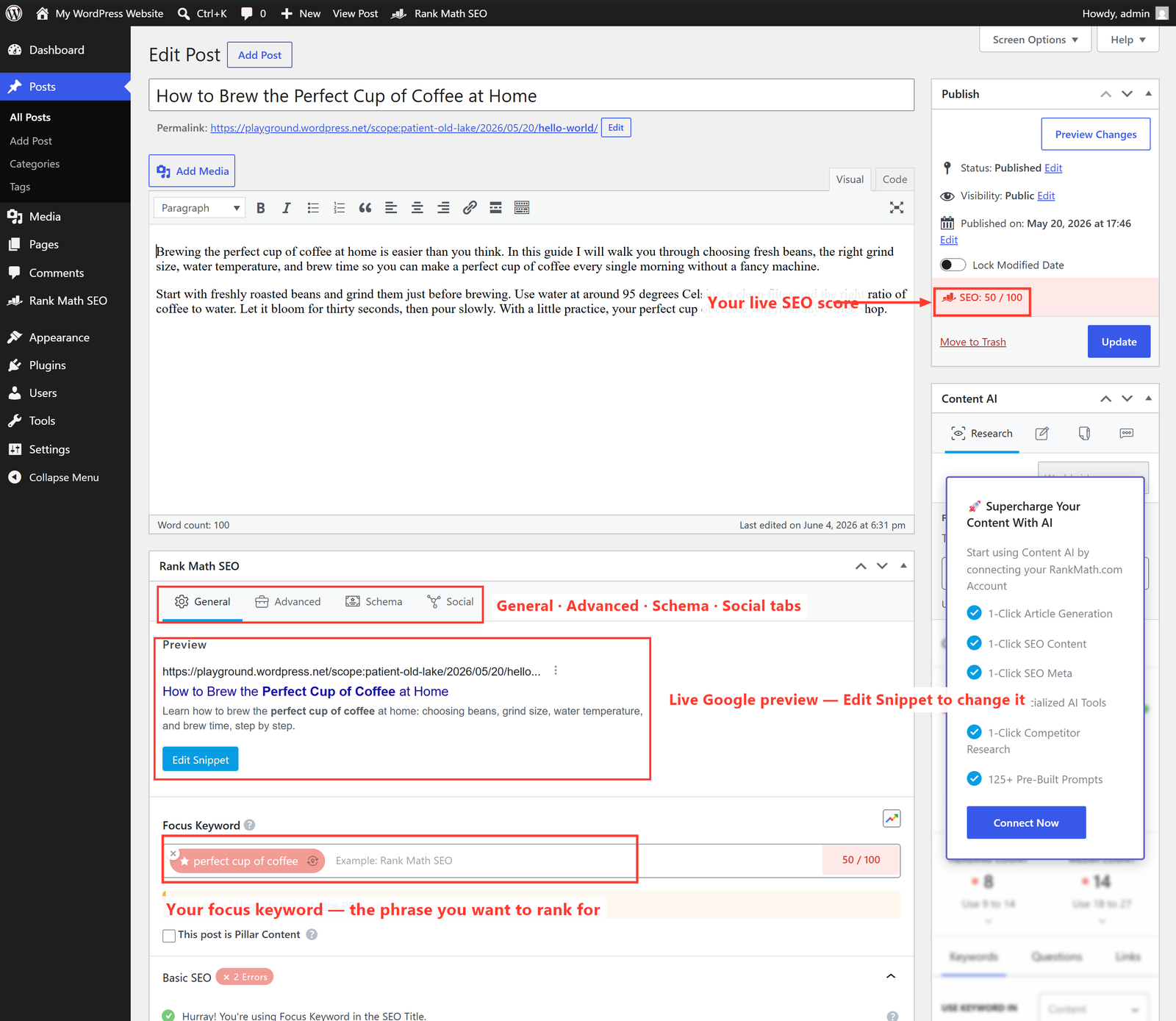
Step 1 — Set your focus keyword
The Focus Keyword is the single phrase you want this page to rank for in Google — for a coffee guide it might be perfect cup of coffee. Type it into the field and Rank Math instantly grades the whole post against it.
Choose it like a real person searching: specific enough to be winnable, broad enough that people actually type it. “Coffee” is impossibly competitive; “how to brew coffee at home” is realistic. One primary keyword per page is the rule.
Step 2 — Edit the snippet (your Google preview)
The Preview shows exactly how your page will look in search results. Click Edit Snippet and you can override the title and meta description for this page (remember, Part 3 set the site-wide default — here you customise it).
- SEO Title — keep it under ~60 characters so Google doesn’t cut it off, and put your focus keyword near the front.
- Meta Description — around 150–160 characters. This is your advert: write it to earn the click, and include the keyword naturally.
- Permalink — a short, clean URL with the keyword in it beats a long messy one.
Step 3 — Work the checklist & the score
The coloured score out of 100 is Rank Math grading your page in real time. Below it sits a checklist grouped into Basic SEO, Additional, Title Readability and Content Readability. Each item is a tick (done) or a cross (room to improve). Knock off the red ones and your score climbs.
The checks that move the needle most:
- Focus keyword in the SEO title, the URL, and the first paragraph.
- Keyword used in at least one subheading (an H2/H3).
- An image with alt text that includes the keyword.
- A sensible content length — thin pages struggle to rank.
- At least one internal link (to another page on your site) and one external link (to a trustworthy source).
- The keyword appears naturally in the body — not stuffed, just present.
⚠️ Don’t chase a perfect 100. A score in the green (80+) is plenty. The checklist is a helpful guide, not a law — never make your writing worse just to tick a box. Google ranks pages that genuinely help readers, and so should you. Write for humans first; use the score as a polish, not a master.
The other tabs (briefly)
Most days you’ll live on the General tab, but it’s worth knowing what the others do:
- Advanced — control whether this specific page is indexed (its robots meta) and set a canonical URL. Leave default unless you have a reason.
- Schema — choose the structured-data type for the page (Article, FAQ, How-to, Product…). More on this in Part 6.
- Social — set a custom title, description and image for when the page is shared on Facebook, LinkedIn or X.
🚀 Try it yourself: In WordPress Playground, write a short test post, set a focus keyword, then watch the score change as you add it to the title, the first line and a subheading. Seeing the checklist tick over live is the fastest way to learn what each rule means.
What’s next
You can now optimise any page with confidence. Next we zoom back out to the technical plumbing that helps Google find and trust everything you publish. In Part 5 we’ll cover sitemaps, connecting Google Search Console, and the Analytics module. Continue to Part 5 →
Want every post on your site optimised to this standard — without it eating your week? That’s exactly the kind of work I do for clients. See how I can help with SEO — or just reach out and say hi.