
You can write the best-optimised posts in the world, but Google still has to find them and you still need to see how they’re doing. That’s what Part 5 is about: your XML sitemap, connecting Google Search Console, and the Analytics module that brings your ranking data right into WordPress.
📚 Part 5 of my in-depth Rank Math series (within my WordPress Plugin Guides). This builds on Part 4, where we optimised individual posts.
What an XML sitemap is
An XML sitemap is a machine-readable list of every page on your site — a map you hand to search engines so they can crawl everything efficiently. You don’t write it; Rank Math builds and updates it automatically (as long as the Sitemap module from Part 2 is on, which it is by default).
Finding your sitemap URL
Go to Rank Math SEO → Sitemap Settings. Right at the top, Rank Math tells you your sitemap address — it almost always ends in /sitemap_index.xml:
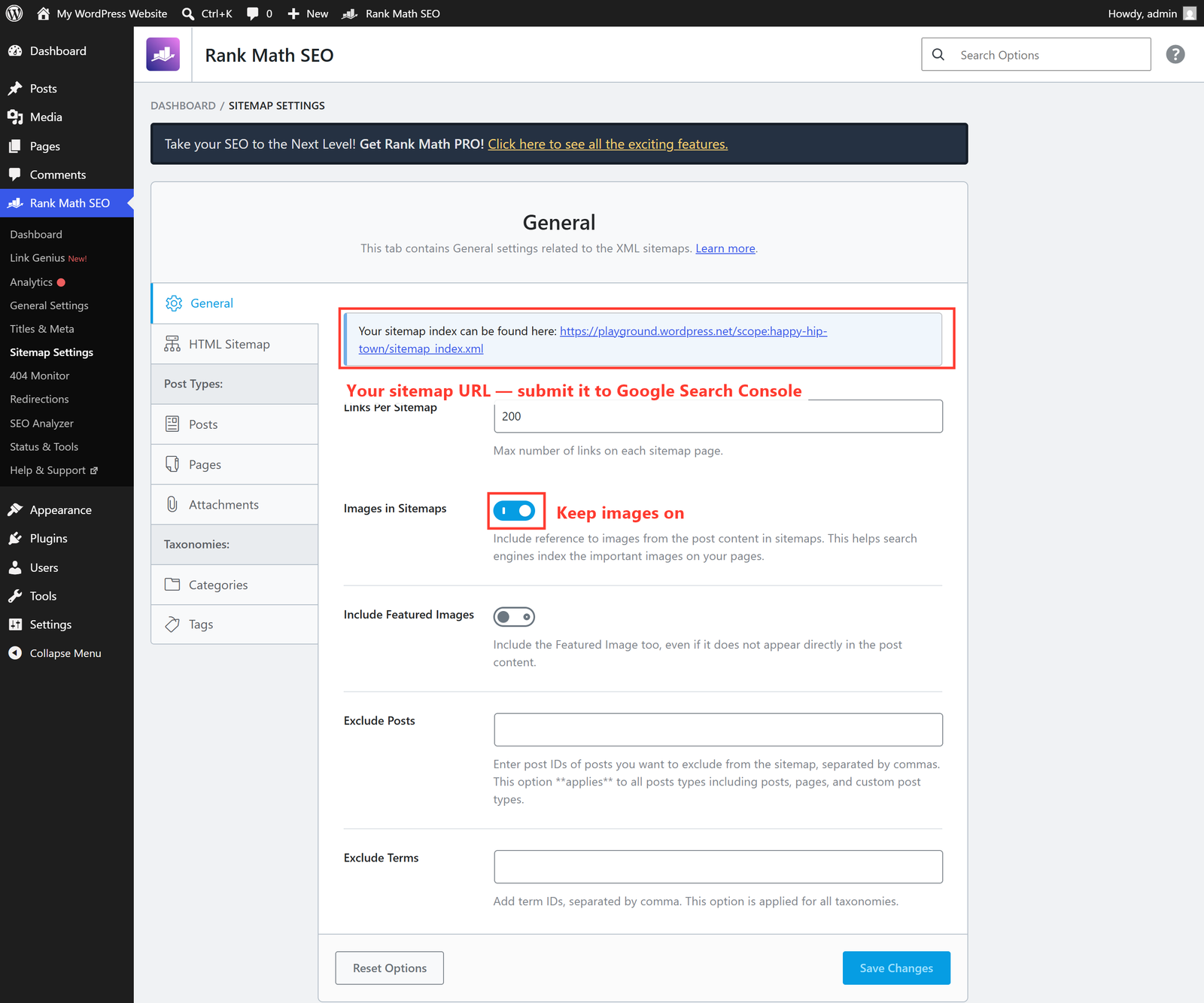
The default settings here are fine for almost everyone. Links Per Sitemap (200) and Images in Sitemaps (on) can be left as they are. The only thing you really need from this screen is that URL.
Connecting Google Search Console
Google Search Console is Google’s free tool that shows you which searches bring people to your site, which pages rank, and any crawl problems. Connecting it is the single most valuable thing you can do after installing Rank Math. The flow is:
- Go to search.google.com/search-console and add your site as a property (the easiest verification is often via your domain or an HTML tag).
- Once verified, open Sitemaps in Search Console and paste your
sitemap_index.xmlURL to submit it. - Back in WordPress, go to Rank Math SEO → General Settings → (or the Analytics module) and connect your Google account so Rank Math can pull the data in.
The Analytics module
With the Analytics module connected, Rank Math adds an Analytics dashboard inside WordPress showing impressions, clicks, average position and your top-performing pages — pulled from Search Console (and Google Analytics if you link it too). It’s the same data you’d get in Google’s own tools, but conveniently next to your content.
⚠️ Data takes time. A brand-new site (or a freshly verified one) won’t show much in Search Console for a few days to a couple of weeks — Google needs to crawl and gather data first. Submit your sitemap, then be patient. Nothing is broken; the numbers simply haven’t arrived yet.
🚀 Try it yourself: Open your own site’s /sitemap_index.xml in a browser right now. You’ll see a tidy index linking to separate sitemaps for posts, pages and so on — exactly what Google reads. It’s a satisfying way to see Rank Math quietly doing its job.
What’s next
Your site is now findable and measurable. In the final instalment, Part 6, we’ll explore Rank Math’s advanced features — Redirections, the 404 Monitor, Schema markup and Local SEO — the tools that take you from “set up” to “seriously dialled in.” Continue to Part 6 →
Want Search Console set up and your sitemap submitted properly — with someone watching the data and acting on it? That’s part of the SEO work I do for clients. See how I can help with SEO — or just reach out and say hi.