
In Part 1 I explained what WordPress actually is. But that raised a very fair follow-up question I hear constantly: “Okay, if WordPress is free software… where does my website actually live? And why am I paying these two separate bills every year?”
Those two bills — your domain and your hosting — are the foundation every WordPress site sits on. They’re also where business owners waste the most money and make the most avoidable mistakes. So let me explain them in plain English, show you how they fit together, and help you avoid the trap that quietly cripples so many small-business websites.
📚 This is Part 2 of my “WordPress Zero to Hero” series. A 10-part, plain-English path from “what is WordPress?” to confidently running your own site. You can see every part of the series here — bookmark it and follow along.
The simplest analogy you’ll ever read
Forget the technical definitions for a second. Here’s the whole thing in one picture:
- Your domain name is your street address — it’s how people find you (e.g. yourbusiness.com).
- Your hosting is the land and building your website actually sits on — it’s where all your pages, images, and content are physically stored.
- Your WordPress site is the shop you build on that land for customers to walk into.
You rent the address (domain) and you rent the land (hosting) — usually from two different companies, which is exactly why you get two bills. Everything else in this post is just detail on those two ideas.
Domain names, explained
A domain name is the human-friendly address people type into their browser to reach you — shahriyar.me, google.com, yourbakery.co.uk. Behind the scenes, computers actually find each other using strings of numbers (IP addresses), but nobody wants to type 142.250.190.78 to visit Google. Domains are the friendly names that point to those numbers.
A few things worth knowing as a business owner:
- You rent it, you don’t own it forever. Domains are registered yearly (typically $10–$20/year for a .com). Miss the renewal and someone else can grab it — so always keep auto-renew on.
- Where you buy it is the “registrar.” Companies like Namecheap, Cloudflare, GoDaddy, or Google Domains’ successors register domains for you.
- The ending matters. .com is still the most trusted for businesses. Country endings (.co.uk, .ca, .com.au) are great for local trust. Avoid obscure cheap endings that look spammy.
- Keep it in your own name. I’ll say this loudly: register the domain under your account and email, not your web designer’s. It’s one of the most common ways business owners accidentally lose control of their own brand.
Web hosting, explained
Web hosting is a rented space on a special, always-on computer (a server) that stores your website and serves it up to anyone who visits. When someone types your domain, their browser is pointed to your hosting, which hands back your pages. That server never sleeps — that’s the whole point. It’s why your site is available at 3am to a customer on the other side of the world.
Not all hosting is equal, though. The main types you’ll come across:
| Type of hosting | What it really is | Best for |
|---|---|---|
| Shared | Your site shares one server with hundreds of others — cheapest, but slower and more crowded | Tiny sites and tight budgets |
| Managed WordPress | Servers tuned specifically for WordPress, with speed, security, and backups handled for you | Most serious businesses |
| VPS / Cloud | A guaranteed slice of server power that scales as you grow | High-traffic or growing sites |
| Dedicated | An entire physical server just for you — powerful and pricey | Large, heavy websites |
For the vast majority of business owners I work with, managed WordPress hosting is the sweet spot. You pay a little more than rock-bottom shared hosting, but speed, security, daily backups, and updates are largely handled for you — which is exactly what you want when running a website isn’t your full-time job.
How the domain and hosting connect
Here’s where people get nervous, but it’s genuinely simple. Your domain has a setting called DNS (think of it as a forwarding instruction) that says: “when someone visits this address, send them to this hosting.” You set that once when your site is built, and it just works from then on.
Inside WordPress itself, you can even see the address your site answers to. In the dashboard under Settings → General, the WordPress Address and Site Address fields hold your domain — this is WordPress knowing its own home:
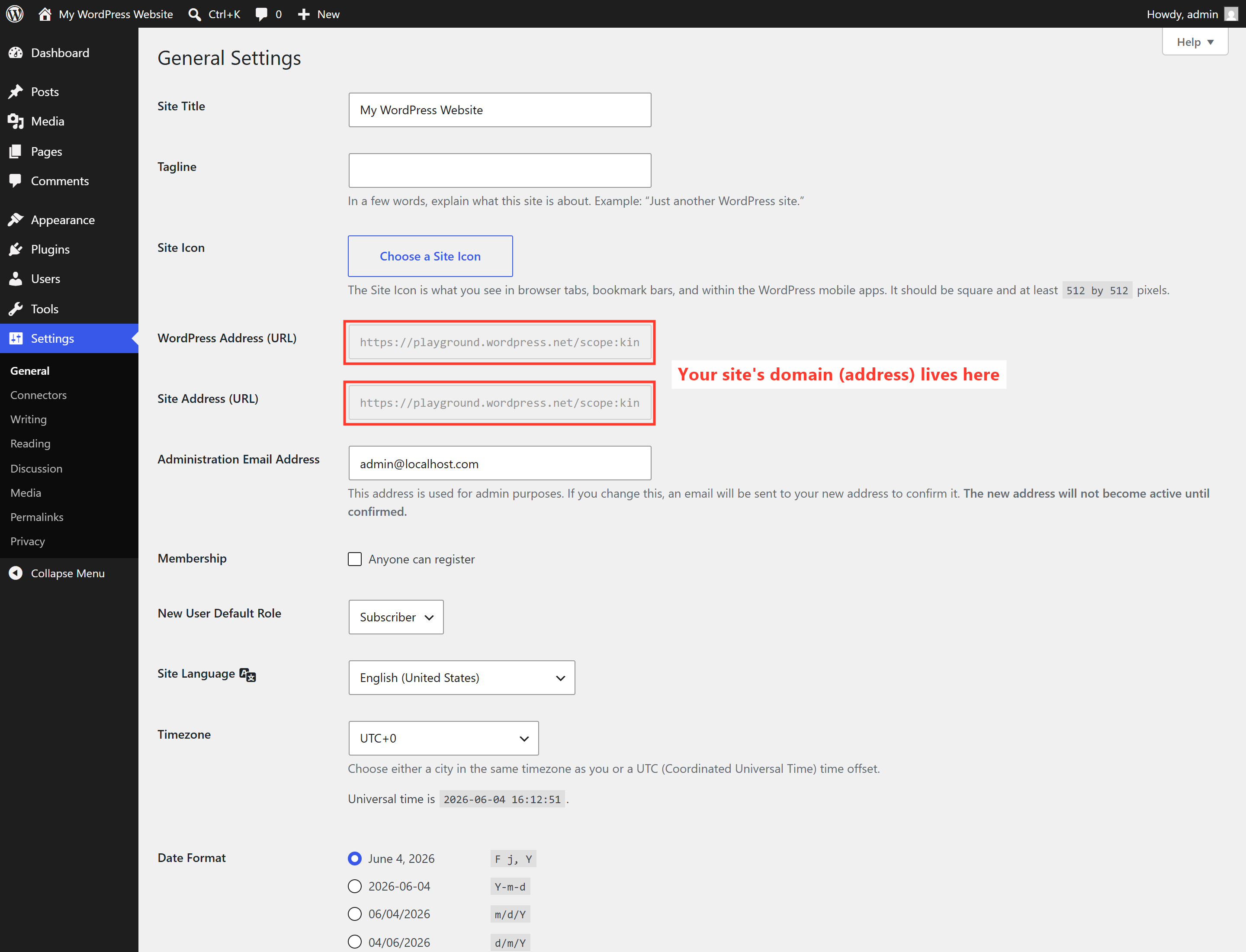
You rarely need to touch these once your site is live — but seeing them helps the whole “domain points to hosting” idea click into place.
The cheap-hosting trap (read this part twice)
⚠️ The $2/month special is rarely a bargain. Ultra-cheap shared hosting is how a lot of small-business sites end up slow, frequently down, and painful to fix. A sluggish site costs you customers and Google rankings — which costs you far more than the few dollars a month you “saved.” Hosting is the foundation; it’s the last place to cut corners.
I’m not saying spend wildly — I’m saying buy reliable, not cheapest. The difference between bad and good hosting is often $10–$25 a month, and it’s the single biggest lever on your site’s speed and uptime. We’ll dig into why speed matters so much in Part 8.
What I recommend for business owners
- Buy your domain in your own account at a reputable registrar, and turn on auto-renew. Stick with .com or your country’s ending.
- Choose quality managed or reputable hosting — prioritize speed, daily backups, free SSL (the padlock in the browser), and real human support.
- Keep the logins. Even if someone builds the site for you, make sure the domain and hosting accounts are ultimately in your name. You should never have to ask permission to access your own business.
- Don’t overthink it on day one. You can start modest and upgrade hosting later without rebuilding your site — that flexibility is one of WordPress’s quiet superpowers.
🚀 The one-minute takeaway: Domain = your address (rent it yearly, keep it in your name). Hosting = the land your site lives on (buy reliable, not cheapest). Point one at the other once, and you’ve got a home for your WordPress site. That’s the entire foundation — everything else we build sits on top of it.
What’s next in the series
You now know where your site lives and how people find it. In Part 3, we’ll walk through the front door: your first login and a friendly tour of the WordPress dashboard — so that control panel stops feeling intimidating and starts feeling like home. Follow the full series here.
Not sure which hosting to choose — or inherited a slow, messy setup you’d rather hand to someone who does this every day? Sorting out domains, hosting, and fast WordPress sites is exactly what I do. See how I can help — or hire me on Upwork and say hi there.