In the years I’ve spent building and rescuing WordPress websites for business owners, one question comes up more than any other: “Okay… but what actually is WordPress?” People know they’re “supposed to” have a WordPress site. They’ve heard the name a hundred times. But almost nobody has had it explained in plain English — without the jargon, the acronyms, and the developer-speak.
So that’s exactly what I’m going to do in this post. By the end, you’ll understand what WordPress is, why nearly half the internet runs on it, and why I choose it for almost every client I work with. No coding knowledge required — I promise.
📚 This is Part 1 of my “WordPress Zero to Hero” series. Over 10 plain-English guides, I’ll take you from “I have no idea what WordPress is” to confidently running, securing, and growing your own website. You can see every part of the series here — bookmark it and follow along.
WordPress in one sentence
WordPress is free software that lets you build and manage a professional website without writing code. That’s it. Instead of hiring someone every time you want to change a phone number, add a blog post, or swap a photo, WordPress gives you a simple, point-and-click control panel to do it yourself.
Think of it like the difference between renting a furnished apartment and owning a house you can renovate whenever you like. A lot of “website builders” hand you a furnished apartment — nice, but you can’t knock down a wall. WordPress hands you the house and the keys.
Why nearly half the web runs on it
Here’s the statistic that surprises most of my clients: WordPress powers around 43% of all websites on the internet. Not 43% of “sites that use a builder” — 43% of everything. From tiny local bakeries to The White House, Sony Music, TechCrunch, and Vogue, an enormous slice of the web is built on this one tool.
Why does that matter to you as a business owner? Because popularity creates a powerful snowball effect:
- You’re never locked in. If you and I stop working together tomorrow, you can hand your site to literally any other WordPress professional on earth. There are millions of us. Compare that to a proprietary platform where only that one company can touch your site.
- There’s a tool for everything. Online store? Booking system? Membership area? Multilingual site? Because so many people use WordPress, there’s almost always a ready-made add-on (called a plugin) for what you need.
- It’s not going anywhere. WordPress has been around since 2003 and is backed by a huge open-source community. Trendy builders come and go (and take your site with them when they shut down). WordPress endures.
- Google likes it. WordPress produces clean, search-friendly websites out of the box, and the best SEO tools in the world are built for it.
The big confusion: WordPress.com vs WordPress.org
This trips up almost everyone, so let me clear it up once and for all. There are two things sharing the “WordPress” name, and they are not the same:
| WordPress.org (the real one) | WordPress.com | |
|---|---|---|
| What it is | The free, open-source software you install on your own hosting | A paid hosting service run by a company (Automattic) that uses the software for you |
| Who owns the site | You. 100%. | You rent space on their platform |
| Control & plugins | Full — install anything, customize everything | Limited unless you pay for higher tiers |
| Best for | Serious businesses that want to own and grow their site | Hobby blogs and quick experiments |
When I (and most professionals) say “WordPress,” we almost always mean WordPress.org — the self-hosted version where you truly own your website. That’s the version this entire series is about, and the one I recommend for any real business.
Every WordPress site has two halves
Once you understand this one idea, everything else clicks into place. A WordPress website is made of two parts: the front-end and the back-end.
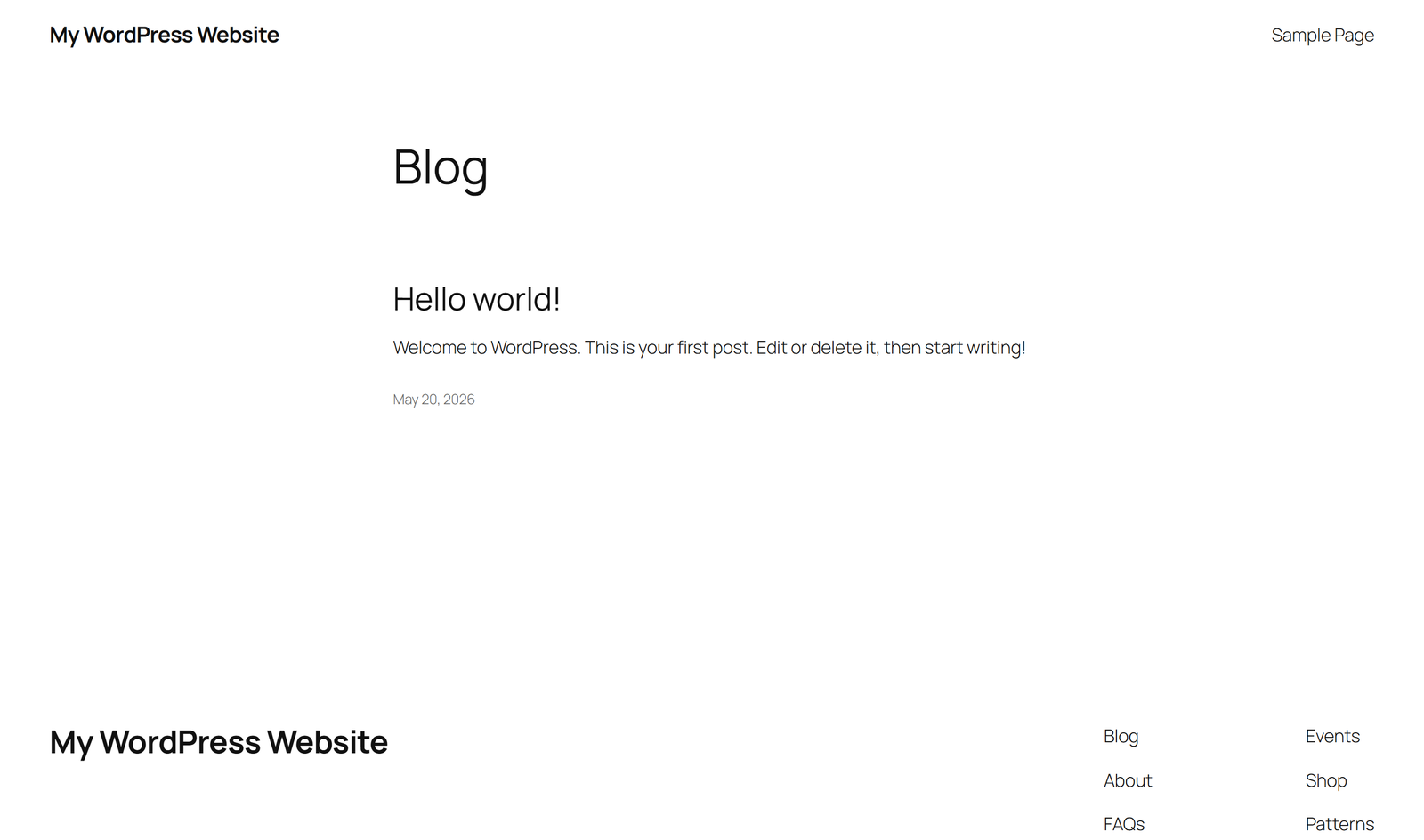
1. The front-end — what your visitors see
This is your actual website: the homepage, your services, your blog, your contact page. It’s what shows up when someone types your address into their browser. Here’s the front-end of a brand-new WordPress site — clean and simple, ready to be turned into anything:
2. The back-end — your private control panel
This is the part the public never sees. It’s called the dashboard (or “wp-admin”), and it’s where you log in to run your site — add pages, write posts, upload photos, change your design, and install new features. This is your website’s cockpit:

See that dark menu running down the left side? That’s the heart of WordPress. A quick tour of the items you’ll use most:
- Posts — your blog articles (like the one you’re reading right now), shown newest-first.
- Pages — your fixed pages like Home, About, Services, and Contact.
- Media — your library of images, PDFs, and videos.
- Appearance — controls how your site looks (your theme and design).
- Plugins — add-ons that give your site new powers (more on these throughout the series).
For example, the Posts screen lists every article on your site, when it was published, and who wrote it — all editable with a click:
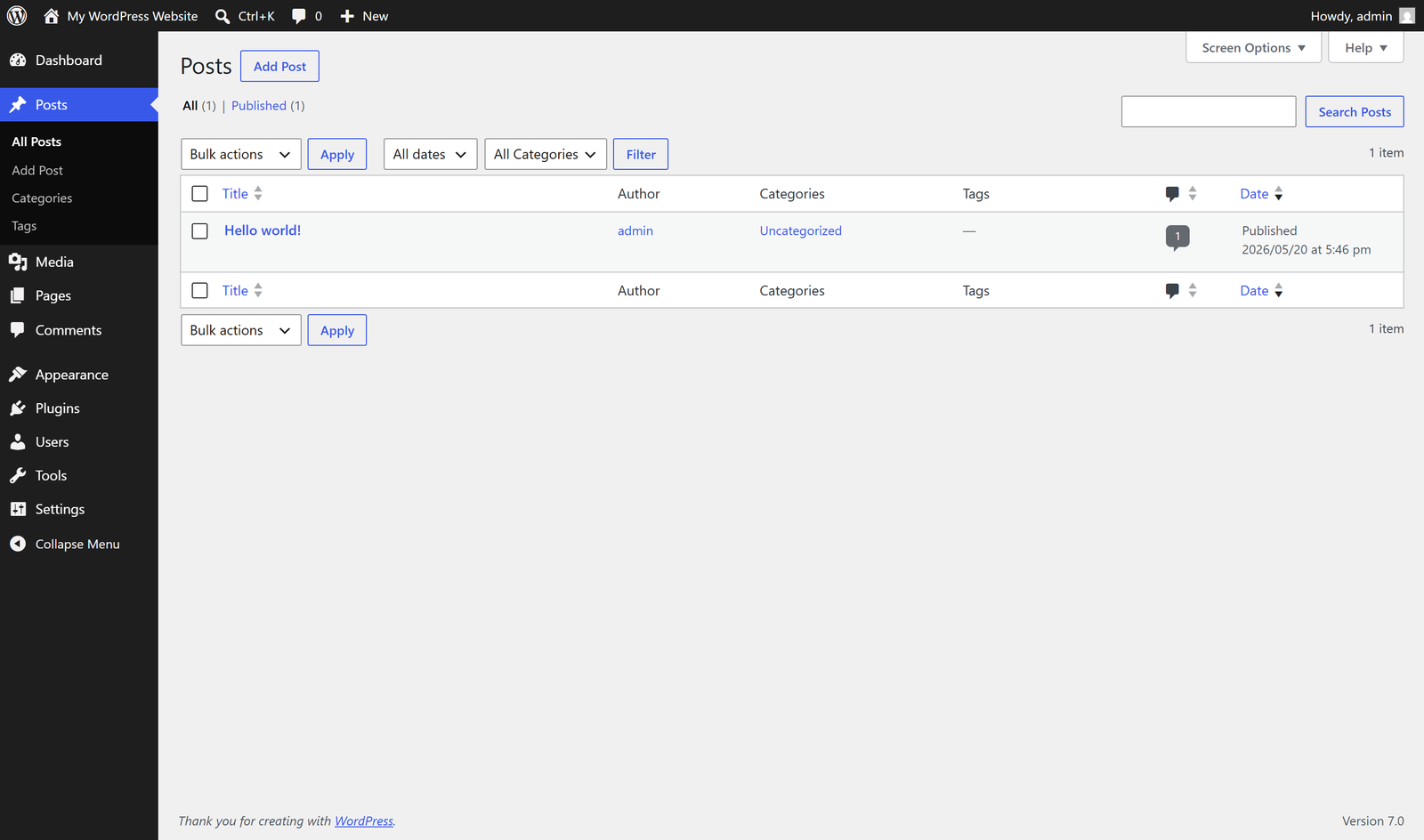
That’s the whole mental model: the front-end is the stage, the back-end is backstage. Your visitors watch the show; you control it from behind the curtain.
Why I build client sites on WordPress
I’ve worked with plenty of platforms over the years. I keep coming back to WordPress for my clients for a few honest reasons:
- You own everything. Your content, your design, your data — it’s all yours, and you can move it anywhere. No platform holding your business hostage.
- It grows with you. Start with a simple 5-page site today; add an online store, a booking system, or a members area later — without rebuilding from scratch.
- You’re not dependent on me forever. I’d love to be your long-term partner, but I never want a client trapped. With WordPress, you can take the wheel anytime.
- It’s genuinely good for SEO. Clean code, fast performance, and the best optimization tools available — everything Google rewards.
Want to try it yourself — right now, for free?
Here’s the fun part. You don’t need to buy hosting or install anything to start poking around WordPress. There’s a free, official tool called WordPress Playground that runs a complete, real WordPress site inside your browser in about 10 seconds.
🚀 Follow along with this series: Open playground.wordpress.net in a new tab. Within seconds you’ll have your own private WordPress dashboard — the exact same screens you see in the screenshots above. Nothing you do there is permanent or public, so click around fearlessly. Every screenshot in this series was captured in Playground, so you can recreate each step yourself as we go.
Go ahead — open it now and find that left-hand menu. Click Posts, then Pages, then Appearance. Getting comfortable clicking around is genuinely 80% of the battle, and you’ve already started.
What’s next in the series
Now that you know what WordPress is, the next question is: where does it actually live? In Part 2, I’ll demystify hosting and domain names — what you’re really paying for, what to choose, and how to avoid the cheap-hosting trap that quietly kills so many small-business sites. Follow the full series here.
Prefer to skip the learning curve and have it done right the first time? Building fast, search-friendly WordPress sites that actually grow businesses is what I do every day. Take a look at how I can help — or just reach out and say hi.